公众号旧文
服务器断联后恢复,怎么知道是啥时候断的?
昨天中午,服务器连不上了,于是去看通知群,果然维护了。

但是很多商家,并不会通知。
当我昨晚登录服务器的时候,脚本提醒我 uptime 只有几小时。
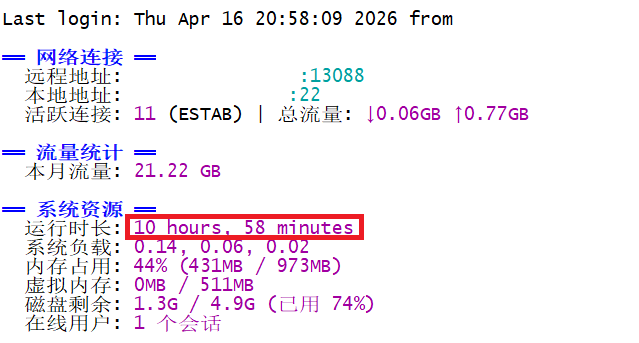
我就知道服务器断联过,但我只能根据 uptime 反推是什么时候恢复的。
服务器系统自身,好像没有现成的方案可以知道是什么时候断联的。
外部工具,我之前写过:
但今天要提供一个新的思路:RIPE Probe
之前也写过 RIPE Atlas 的介绍:
但是反响平平,借今天这篇文章,再来说说怎么用它来记录断连时间。
简单的说,RIPE Software Probe 就是安装在服务器上的一个小软件。
安装后运行,它会自动和控制服务器建立长连接,而且每次连接和断开连接,都会记录时间并自动计算时长
下面是 RIPE Software Probe 在 Debian 12 上的安装方法:
1、下载 .deb 文件
amd64:
curl -O 'https://ftp.ripe.net/ripe/atlas/software-probe/debian/dists/bookworm/main/binary-amd64/ripe-atlas-repo_1.5-5_all.deb'arm64:
curl -O 'https://ftp.ripe.net/ripe/atlas/software-probe/debian/dists/bookworm/main/binary-arm64/ripe-atlas-repo_1.5-5_all.deb'2、安装软件源配置包
dpkg -i ripe-atlas-repo_1.5-5_all.deb3、安装软件
apt-get update
apt-get install ripe-atlas-probe
4、记录 SSH Key
Installation complete! Your probe's public key is:

ssh-rsa abcdefg...xyz hostname
5、启动软件
systemctl enable --now ripe-atlas.service6、注册 RIPE 网站
https://access.ripe.net/registration7、登录以后选择 Probe,再选择 Apply a probe

8、输入相应的信息,AS和服务器位置,最后输入 SSH Key 就结束了。
在 Network 标签中,可以看到每次连接的开始时间和结束时间。
下面红框里就是今天服务器的断联时间和对应的时长。

可以看到和商家的公告时长一致:
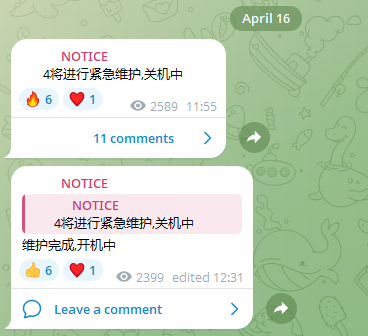
时间不一致是因为 Ripe Probe 的时间是 UTC,不是 UTC+8。
别的系统可以参考下面的官方安装和注册说明:
https://atlas.ripe.net/docs/howtos/software-probes.html
如果你有更好的记录方案,欢迎在评论区推荐给大家。